Node.js is a cross-platform JavaScript environment that can be used for server-side scripting. Due to its non-blocking workflow, Node.js is popular among the web developers for building a dynamic web application. Node Package Manager also known as npm is the package manager for Node.js. It also serves as a command-line utility for interacting with the npm online repository for package installation, version management, and dependency management. It is important to have Node.js installed in order to use npm. Also, working with updated versions of Node.js and npm ensures better performance and added features.Stable version of Node.js can be downloaded or updated from the official Node.js website as well as through the command line using Node Version Manager(nvm). nvm was originally developed for Linux systems, however nvm can be installed separately for Windows system by the following steps:
Go to this site: https://github.com/coreybutler/nvm-windows/releases
Install and unzip the nvm-setup.zip file
From cmd type nvm -v to ensure nvm is installed.
After installing nvm, the following can be done to update Node.js to the latest version:
nvm install <version>
Check the list of available Node.js version in the system using the following command:
nvm list
To use the desired version, use the following command:
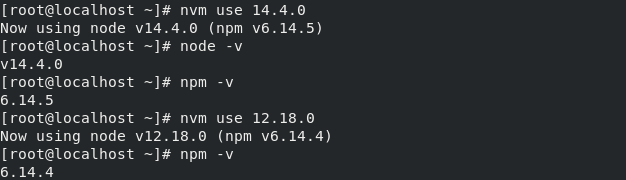
nvm use <version>
Update npm: To update NPM, use the following command:
npm install -g npm
Output:
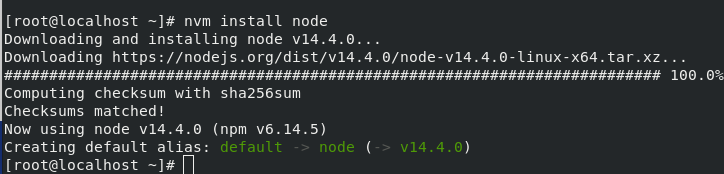
Below is a demonstration for updating Node.js and npm versions for Linux systems. Install nvm in Linux:
Integrating a Node.js app with Firebase and MongoDB involves a few steps:
Create a Firebase project: Go to the Firebase console and create a new project. Once created, you will need to obtain the Firebase configuration details, including the API key, project ID, and messaging sender ID.
Install the Firebase SDK: In your Node.js project, install the Firebase SDK using the following command:
npm install firebase
Initialize Firebase: Initialize Firebase in your Node.js app using the configuration details obtained in step 1.
Create a MongoDB database: Create a MongoDB database to store your app's data. You can use a cloud-based service like MongoDB Atlas or set up your own MongoDB server.
Install the MongoDB driver: Install the MongoDB driver using the following command:
npm install mongodb
Connect to MongoDB: Connect to your MongoDB database using the MongoDB driver.
Start using Firebase and MongoDB: You can now start using Firebase and MongoDB in your Node.js app. For example, you can use Firebase to handle authentication and MongoDB to store user data.
javascript
const usersCollection = db.collection("users");
firebase.auth().onAuthStateChanged(function(user) {
if (user) {
// User is signed in.const userData = {
uid: user.uid,
email: user.email
};
usersCollection.insertOne(userData, function(err, res) {
if (err) throw err;
console.log("User data inserted");
client.close();
});
} else {
// User is signed out.
}
});
This is just a basic example, and there are many other ways to integrate Firebase and MongoDB in your Node.js app.
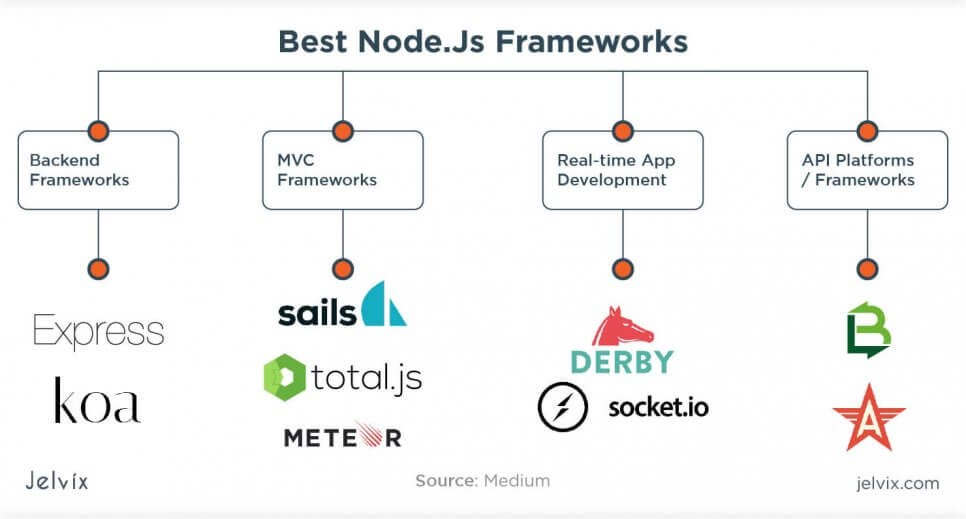
Development frameworks are used to organize the development progress. Developers get the ready structure for their code base, can apply reusable elements, and increase product speed. Using web frameworks for the front end is common — developers use frameworks to work with JavaScript.
Using frameworks for backend is slightly less common, but it is just as helpful. When we work on web development projects, we apply frameworks to a client- and server-side alike — because it’s highly efficient and convenient.
How to choose the best Node.js framework?
Scalability
Node.js web frameworks provide a defined structure for a codebase. In the long run, they decide what characteristics your product will have, how the app will process the data, and handle computing. You want a framework that isn’t too opinionated — it shouldn’t limit you in possible ways of executing the project. If the framework boxes you one method, it definitely is not good enough.
Functionality
Support of declarative programming: such programming describes the platform saved by a feature and its solution. We prefer the frameworks that support declarative metadata describing the parameters and middleware of Node.js handlers.
Cluster management: it’s nice when a framework allows organizing, previewing, editing, and managing clusters, as well as sorting them by their characteristics.
Middleware support: middleware is software that helps developers improve their application’s performance, security, etc. It’s not a framework, but it can be integrated. Middleware helps to optimize your application functionality and to deliver a better experience.
Batch support: not all frameworks are equally good at handling multiple background processes simultaneously. We prefer frameworks that let us access the same databases and APIs caches, regardless if they are currently running. This allows us to get many things done as soon as possible.
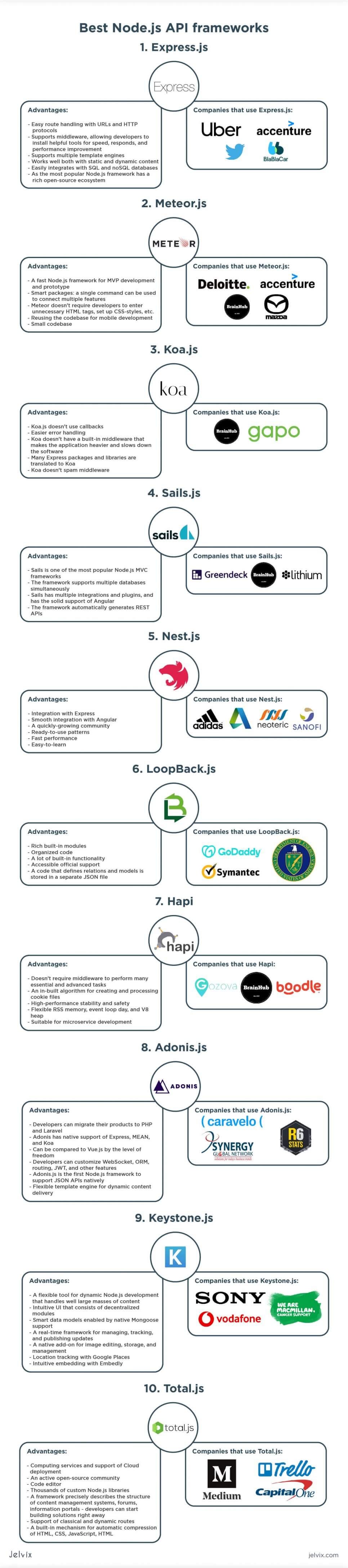
Best Node.js API frameworks
Express.js
Advantages
Easy route handling with URLs and HTTP protocol;
Supports middleware, allowing developers to install helpful tools for speed, responds, and performance improvement;
As the most popular Node.js framework has a rich open-source ecosystem.
Companies that use Express.js
Meteor.js
The framework can be integrated with Cordova, which means developers are able to build native mobile apps while reusing Meteor’s code. That said, Meteor is hardly the best option for complex long-term projects; the ecosystem of the framework has the reputation of being a ghost town — the framework has been getting increasingly less popular over the years. Still, it’s a good choice for time- and cost-efficient solutions.
Smart packages: a single command can be used to connect multiple features;
Small codebase: in Meteor, developers can get quite a lot of functionality with only a few lines of code.
Companies that use Meteor.js
Koa.js
Koa is one of the simplest Node.js frameworks out there. It’s elegant and lightweight. On top of that, the installer file doesn’t feature a built-in templating tool or router. Many Express plugins and libraries have been adapted to Koa. It’s similar to Express, only simpler and slightly less universal.
Koa is not hugely popular among enterprises, and it’s considered a startup solution that offers a lightweight approach to web development. The framework mainly gained traction when Express wasn’t updated for some time, but now, after Express’ team resumed active support, the framework is losing its initial traction.
Advantages of Koa.jsCompanies that use Koa
Sails.js
Its model-view-controller is similar to what Ruby on Rails offers but supports more data requests. It’s a popular choice for real-time services and data-based applications. The framework is famous for its ability to generate REST JSON automatically and default HTTP support.
Advantages of Sails.js
Sails is one of the most popular Node.js MVC frameworks;
The framework supports multiple databases simultaneously;
Sails has multiple integrations and plugins, and has a solid support of Angular;
The framework automatically generates REST APIs;
Companies that use Sails.js
Nest.js
Node.js’ architecture is hugely inspired by Angular — to the point where both teams participate in the events together. The logic behind code providers, controllers, pipes, interceptors is similar to Angular’s structural solutions. Developers that worked with Angular before will find Nest easy to master.
Advantages of Nest.js
Integration with Express: add-ons and packages for Express can be easily reused for Nest;
Smooth integration with Angular: teams that use Angular for front-end development, will have no issues connecting Nest to their codebase;
A quickly-growing community: many Node.js frameworks had their growth peak back in 2013, but Nest.js keeps the momentum and can now easily compete with Express;
Ready-to-use patterns: Nest.js is a highly predefined framework that does a lot of basic development activities for developers;
Fast performance;
Easy-to-learn: if you have used Angular or Express before, you would easily switch to Nest.
Companies that use Nest.js
LoopBack.js
An open-source Node.js framework that uses ready modules to connect Node.js to APIs of HTML5, iOS, and Android. With LoopBack, applications can record data, upload files, create emails, create push notifications, register users, and request information from databases.
The application supports the SQL and NoSQL databases, allowing conversion of web applications to mobile apps, running the software locally, or in the Cloud, and changing the settings of push-notifications.
Advantages of LoopBack.jsCompanies that use LoopBack.js
Hapi
First and foremost, Hapi checks each installed NPM package. We already discussed how problematic Node Package Manager content could be — Hapi solves this issue by running a security test. Hapi focuses on enabling advanced cookie functionality, secure HTTPs, and authorization settings.
All security updates in Hapi’s development have a clearly defined immutable ownership. If something goes wrong, developers know whom to hold accountable. Hapi also offers a collection of plugins, although not as many as in Express or Nest.
Hapi’s advantagesCompanies that use Hapi
Adonis.js
The framework was hugely inspired by Laravel, so developers who worked with this PHP framework will perhaps have the easiest time transferring to Adonis.js.
Advantages of Adonis.jsCompanies that use Adonis:
Keystone.js
It’s a for static and dynamic content management that is commonly used for content-heavy web projects. Information portals, content management systems, online editorials, forums, social media, and e-commerce platforms are the most common applications of Keystone.
Keystone consists of a range of modules, supporting core functionality for backend, UI tools, web protocols, and Mongoose 4 — a database for object modeling in Node.js.
Advantages
A flexible tool for dynamic Node.js development that can handle large masses of content quite well and easily;
Intuitive UI that consists of decentralized modules;
Smart data models enabled by native Mongoose support;
A real-time framework for managing, tracking, and publishing updates;
A native add-on for image editing, storage, and management;
The platform offers more than 100 services for JavaScript development, Cloud computing, code sharing, cooperation, UI development.
Advantages
Computing services and support of Cloud deployment;
An active open-source community;
Code editor;
Thousands of custom Node.js libraries;
A framework precisely describes the structure of content management systems, forums, information portals — developers can start building solutions right away;
Support of classical and dynamic routes; developers can use the existing ones or edit WebSocket on their own;
A built-in mechanism for automatic compression of HTML, CSS, JavaScript, HTML.
Companies that use Total.js
Conclusions
Even though Node.js frameworks technically aren’t essential for backend development, they make a huge difference in development efficiency, product performance, and code quality.
Having access to predefined templates, libraries, and middleware allows developers to save time on writing repetitive code, getting through thousands of callbacks, and struggling to integrate Node.js with front-end frameworks.
Some frameworks are better equipped to handle dynamic content, while others fit best for MVP development.






.jpg "MongoDB vs Firebase")